Identifying Necessary Transparency Moments In Agentic AI (Part 1)

Email Newsletter
Weekly tips on front-end & UX.
Trusted by 182,000+ folks.

 SurveyJS: White-Label Survey Solution for Your JS App

 Celebrating 10 million developers
 Try ProtoPie AI free →
Designing for autonomous agents presents a unique frustration. We hand a complex task to an AI, it vanishes for 30 seconds (or 30 minutes), and then it returns with a result. We stare at the screen. Did it work? Did it hallucinate? Did it check the compliance database or skip that step?
We typically respond to this anxiety with one of two extremes. We either keep the system a Black Box, hiding everything to maintain simplicity, or we panic and provide a Data Dump, streaming every log line and API call to the user.
Neither approach directly addresses the nuance needed to provide users with the ideal level of transparency.
The Black Box leaves users feeling powerless. The Data Dump creates notification blindness, destroying the efficiency the agent promised to provide. Users ignore the constant stream of information until something breaks, at which point they lack the context to fix it.
We need an organized way to find the balance. In my previous article, “Designing For Agentic AI”, we looked at interface elements that build trust, like showing the AI’s intended action beforehand (Intent Previews) and giving users control over how much the AI does on its own (Autonomy Dials). But knowing which elements to use is only part of the challenge. The harder question for designers is knowing when to use them.
How do you know which specific moment in a 30-second workflow requires an Intent Preview and which can be handled with a simple log entry?
This article provides a method to answer that question. We will walk through the Decision Node Audit. This process gets designers and engineers in the same room to map backend logic to the user interface. You will learn how to pinpoint the exact moments a user needs an update on what the AI is doing. We will also cover an Impact/Risk matrix that will help to prioritize which decision nodes to display and any associated design pattern to pair with that decision.
Transparency Moments: A Case Study Example
Consider Meridian (not real name), an insurance company that uses an agentic AI to process initial accident claims. The user uploads photos of vehicle damage and the police report. The agent then disappears for a minute before returning with a risk assessment and a proposed payout range.
Initially, Meridian’s interface simply showed Calculating Claim Status. Users grew frustrated. They had submitted several detailed documents and felt uncertain about whether the AI had even reviewed the police report, which contained mitigating circumstances. The Black Box created distrust.
To fix this, the design team conducted a Decision Node Audit. They found that the AI performed three distinct, probability-based steps, with numerous smaller steps embedded:
- Image Analysis
The agent compared the damage photos against a database of typical car crash scenarios to estimate the repair cost. This involved a confidence score. - Textual Review
It scanned the police report for keywords that affect liability (e.g., fault, weather conditions, sobriety). This involved a probability assessment of legal standing. - Policy Cross Reference
It matched the claim details against the user’s specific policy terms, searching for exceptions or coverage limits. This also involved probabilistic matching.
The team turned these steps into transparency moments. The interface sequence was updated to:
- Assessing Damage Photos: Comparing against 500 vehicle impact profiles.
- Reviewing Police Report: Analyzing liability keywords and legal precedent.
- Verifying Policy Coverage: Checking for specific exclusions in your plan.
The system still took the same amount of time, but the explicit communication about the agent’s internal workings restored user confidence. Users understood that the AI was performing the complex task it was designed for, and they knew exactly where to focus their attention if the final assessment seemed inaccurate. This design choice transformed a moment of anxiety into a moment of connection with the user.
Applying the Impact/Risk Matrix: What We Chose to Hide
Most AI experiences have no shortage of events and decision nodes that could potentially be displayed during processing. One of the most critical outcomes of the audit was to decide what to keep invisible. In the Meridian example, the backend logs generated 50+ events per claim. We could have defaulted to displaying each event as they were processed as part of the UI. Instead, we applied the risk matrix to prune them:
- Log Event: Pinging Server West-2 for redundancy check.
- Filter Verdict: Hide. (Low Stakes, High Technicality).
- Log Event: Comparing repair estimate to BlueBook value.
- Filter Verdict: Show. (High Stakes, impacts user’s payout).
By cutting out the unnecessary details, the important information — like the coverage verification — was more impactful. We created an open interface and designed an open experience.
This approach uses the idea that people feel better about a service when they can see the work being done. By showing the specific steps (Assessing, Reviewing, Verifying), we changed a 30-second wait from a time of worry (“Is it broken?”) to a time of feeling like something valuable is being created (“It’s thinking”).
Let’s now take a closer look at how we can review the decision-making process in our products to identify key moments that require clear information.
The Decision Node Audit
Transparency fails when we treat it as a style choice rather than a functional requirement. We have a tendency to ask, “What should the UI look like?” before we ask, “What is the agent actually deciding?”
The Decision Node Audit is a straightforward way to make AI systems easier to understand. It works by carefully mapping out the system’s internal process. The main goal is to find and clearly define the exact moments where the system stops following its set rules and instead makes a choice based on chance or estimation. By mapping this structure, creators can show these points of uncertainty directly to the people using the system. This changes system updates from being vague statements to specific, reliable reports about how the AI reached its conclusion.
In addition to the insurance case study above, I recently worked with a team building a procurement agent. The system reviewed vendor contracts and flagged risks. Originally, the screen displayed a simple progress bar: “Reviewing contracts.” Users hated it. Our research indicated they felt anxious about the legal implications of a missing clause.
We fixed this by conducting a Decision Node Audit. I’ve included a step-by-step checklist for conducting this audit at the conclusion of this article.
We ran a session with the engineers and outlined how the system works. We identified “Decision Points” — moments where the AI had to choose between two good options.
In standard computer programs, the process is clear: if A happens, then B will always happen. In AI systems, the process is often based on chance. The AI thinks A is probably the best choice, but it might only be 65% certain.
In the contract system, we found a moment when the AI checked the liability terms against our company rules. It was rarely a perfect match. The AI had to decide if a 90% match was good enough. This was a key decision point.
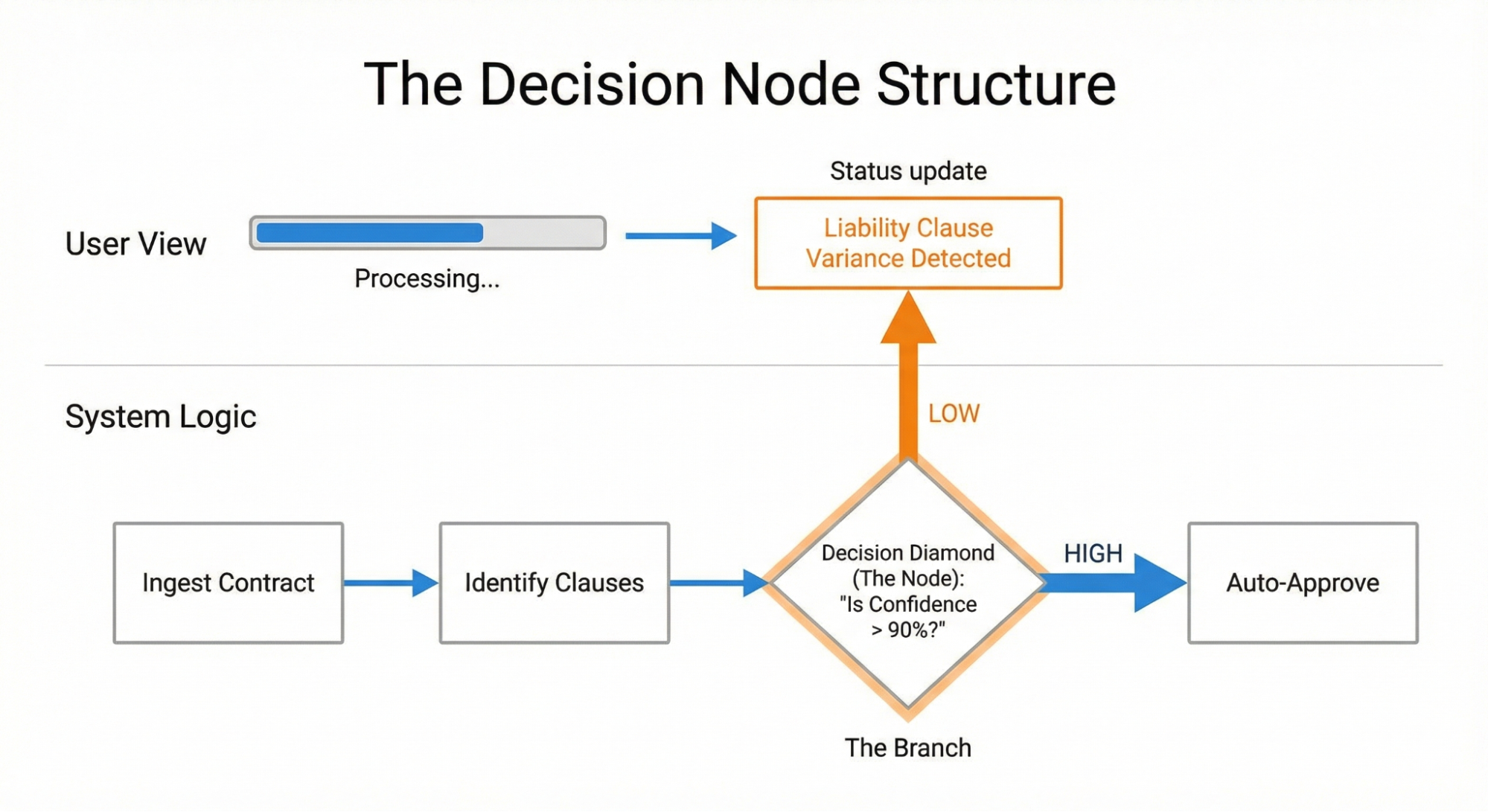
Once we identified this node, we exposed it to the user. Instead of “Reviewing contracts,” the interface updated to say: “Liability clause varies from standard template. Analyzing risk level.”
This specific update gave users confidence. They knew the agent checked the liability clause. They understood the reason for the delay and gained trust that the desired action was occurring on the back end. They also knew where to dig in deeper once the agent generated the contract.
To check how the AI makes decisions, you need to work closely with your engineers, product managers, business analysts, and key people who are making the choices (often hidden) that affect how the AI tool functions. Draw out the steps the tool takes. Mark every spot where the process changes direction because a probability is met. These are the places where you should focus on being more transparent.
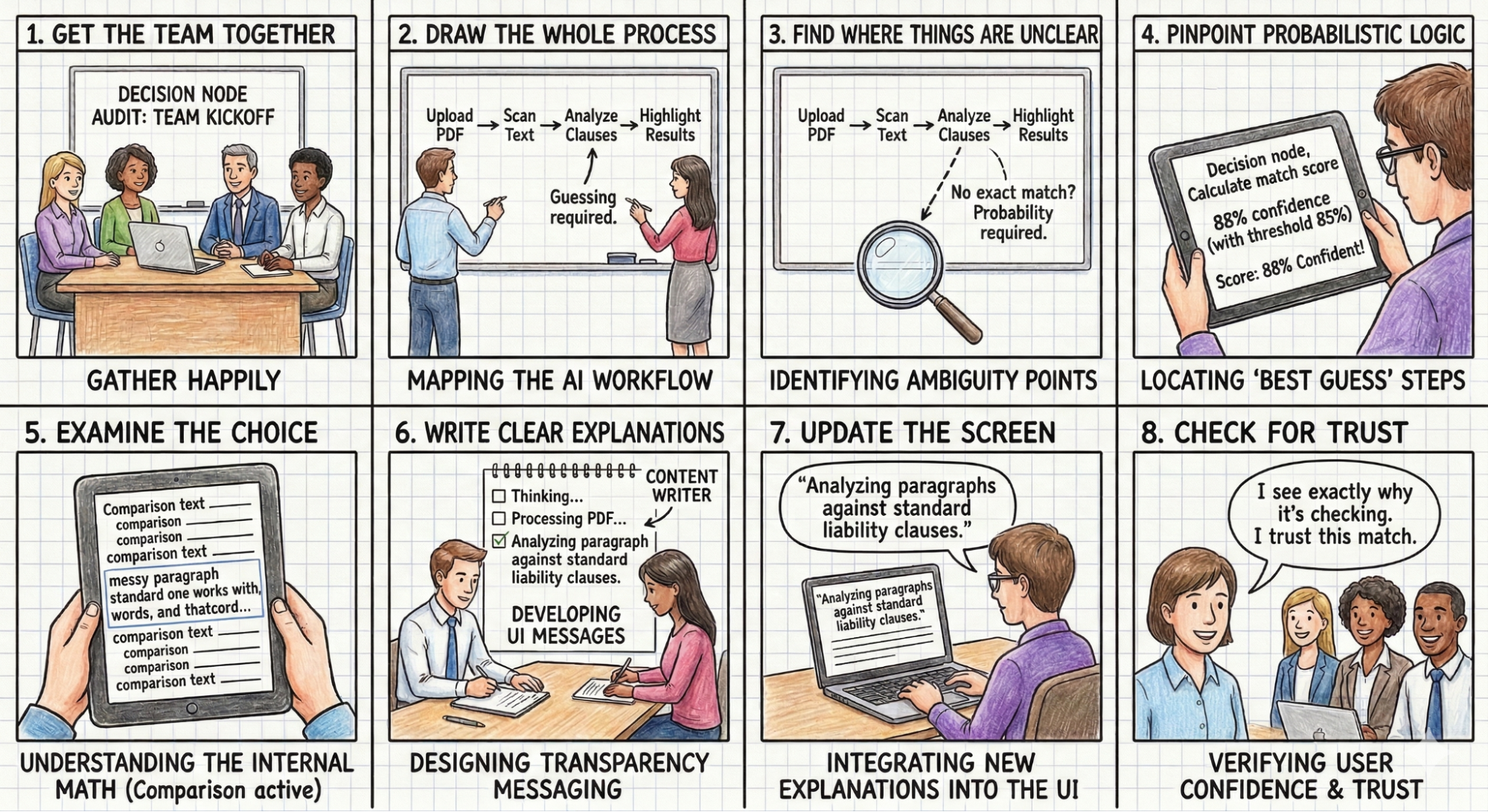
As shown in Figure 2 below, the Decision Node Audit involves these steps:
Get the team together: Bring in the product owners, business analysts, designers, key decision-makers, and the engineers who built the AI. For example,
Think about a product team building an AI tool designed to review messy legal contracts. The team includes the UX designer, the product manager, the UX researcher, a practicing lawyer who acts as the subject-matter expert, and the backend engineer who wrote the text-analysis code.
Draw the whole process: Document every step the AI takes, from the user’s first action to the final result.
The team stands at a whiteboard and sketches the entire sequence for a key workflow that involves the AI searching for a liability clause in a complex contract. The lawyer uploads a fifty-page PDF → The system converts the document into readable text. → The AI scans the pages for liability clauses. → The user waits. → Moments or minutes later, the tool highlights the found paragraphs in yellow on the user interface. They do this for many other workflows that the tool accommodates as well.
Find where things are unclear: Look at the process map for any spot where the AI compares options or inputs that don’t have one perfect match.
The team looks at the whiteboard to spot the ambiguous steps. Converting an image to text follows strict rules. Finding a specific liability clause involves guesswork. Every firm writes these clauses differently, so the AI has to weigh multiple options and make a prediction instead of finding an exact word match.
Identify the ‘best guess’ steps: For each unclear spot, check if the system uses a confidence score (for example, is it 85% sure?). These are the points where the AI makes a final choice.
The system has to guess (give a probability) which paragraph(s) closely resemble a standard liability clause. It assigns a confidence score to its best guess. That guess is a decision node. The interface needs to tell the lawyer it is highlighting a potential match, rather than stating it found the definitive clause.
Examine the choice: For each choice point, figure out the specific internal math or comparison being done (e.g., matching a part of a contract to a policy or comparing a picture of a broken car to a library of damaged car photos).
The engineer explains that the system compares the various paragraphs against a database of standard liability clauses from past firm cases. It calculates a text similarity score to decide on a match based on probabilities.
Write clear explanations: Create messages for the user that clearly describe the specific internal action happening when the AI makes a choice.
The content designer writes a specific message for this exact moment. The text reads: Comparing document text to standard firm clauses to identify potential liability risks.
Update the screen: Put these new, clear explanations into the user interface, replacing vague messages like “Reviewing contracts.”
The design team removes the generic Processing PDF loading spinner. They insert the new explanation into a status bar located right above the document viewer while the AI thinks.
Check for Trust: Make sure the new screen messages give users a simple reason for any wait time or result, which should make them feel more confident and trusting.
The Impact/Risk Matrix
Once you look closely at the AI’s process, you’ll likely find many points where it makes a choice. An AI might make dozens of small choices for a single complex task. Showing them all creates too much unnecessary information. You need to group these choices.
You can use an Impact/Risk Matrix to sort these choices based on the types of action(s) the AI is taking. Here are examples of impact/risk matrices:
First, look for low-stakes and low-impact decisions.
Low Stakes / Low Impact
- Example: Organizing a file structure or renaming a document.
- Transparency Need: Minimal. A subtle toast notification or a log entry suffices. Users can undo these actions easily.
Then identify the high-stakes and high-impact decisions.
High Stakes / High Impact
- Example: Rejecting a loan application or executing a stock trade.
- Transparency Need: High. These actions require Proof of Work. The system must demonstrate the rationale before or immediately as it acts.
Consider a financial trading bot that treats all buy/sell orders the same. It executes a $5 trade with the same opacity as a $50,000 trade. Users might question whether the tool recognizes the potential impact of transparency on trading on a large dollar amount. They need the system to pause and show its work for the high-stakes trades. The solution is to introduce a Reviewing Logic state for any transaction exceeding a specific dollar amount, allowing the user to see the factors driving the decision before execution.
Mapping Nodes to Patterns: A Design Pattern Selection Rubric
Once you have identified your experience’s key decision nodes, you must decide which UI pattern applies to each one you’ll display. In Designing For Agentic AI, we introduced patterns like the Intent Preview (for high-stakes control) and the Action Audit (for retrospective safety). The decisive factor in choosing between them is reversibility.
We filter every decision node through the impact matrix in order to assign the correct pattern:
High Stakes & Irreversible: These nodes require an Intent Preview. Because the user cannot easily undo the action (e.g., permanently deleting a database), the transparency moment must happen before execution. The system must pause, explain its intent, and require confirmation.
High Stakes & Reversible: These nodes can rely on the Action Audit & Undo pattern. If the AI-powered sales agent moves a lead to a different pipeline, it can do so autonomously as long as it notifies the user and offers an immediate Undo button.
By strictly categorizing nodes this way, we avoid “alert fatigue.” We reserve the high-friction Intent Preview only for the truly irreversible moments, while relying on the Action Audit to maintain speed for everything else.
| Reversible | Irreversible | |
|---|---|---|
| Low Impact | Type: Auto-Execute UI: Passive Toast / Log Ex: Renaming a file | Type: Confirm UI: Simple Undo option Ex: Archiving an email |
| High Impact | Type: Review UI: Notification + Review Trail Ex: Sending a draft to a client | Type: Intent preview UI: Modal / Explicit Permission Ex: Deleting a server |
Table 1: The impact and reversibility matrix can then be used to map your moments of transparency to design patterns.
Qualitative Validation: “The Wait, Why?” Test
You can identify potential nodes on a whiteboard, but you must validate them with human behavior. You need to verify whether your map matches the user’s mental model. I use a protocol called the “Wait, Why?” Test.
Ask a user to watch the agent complete a task. Instruct them to speak aloud. Whenever they ask a question, “Wait, why did it do that?” or “Is it stuck?” or “Did it hear me?” — you mark a timestamp.
These questions signal user confusion. The user feels their control slipping away. For example, in a study for a healthcare scheduling assistant, users watched the agent book an appointment. The screen sat static for four seconds. Participants consistently asked, “Is it checking my calendar or the doctor’s?”
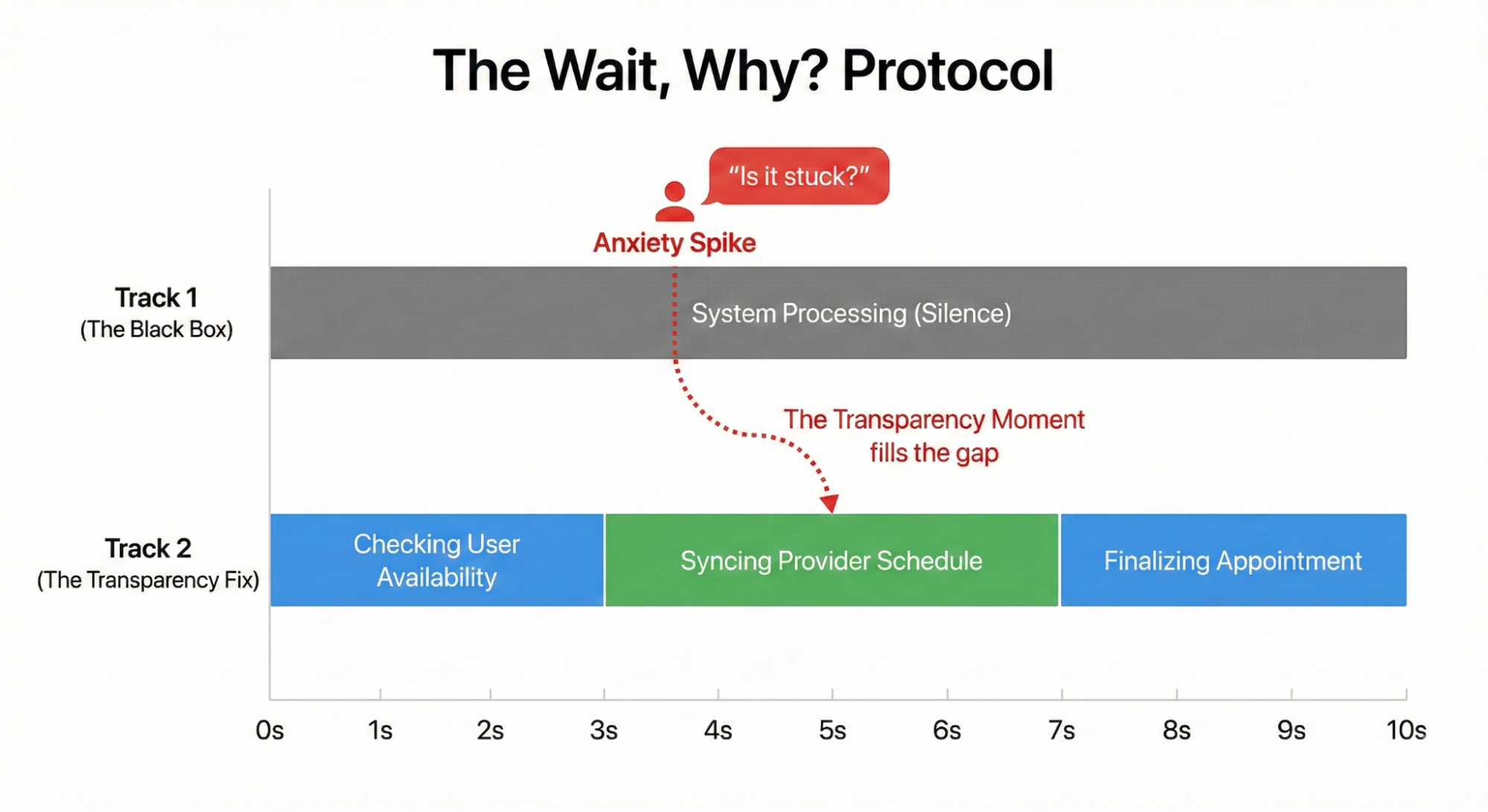
That question revealed a missing Transparency Moment. The system needed to split that four-second wait into two distinct steps: “Checking your availability” followed by “Syncing with provider schedule.”
This small change reduced users’ expressed levels of anxiety.
Transparency fails when it only describes a system action. The interface must connect the technical process to the user’s specific goal. A screen displaying “Checking your availability” falls flat because it lacks context. The user understands that the AI is looking at a calendar, but they do not know why.
We must pair the action with the outcome. The system needs to split that four-second wait into two distinct steps. First, the interface displays “Checking your calendar to find open times.” Then it updates to “Syncing with the provider’s schedule to secure your appointment.” This grounds the technical process in the user’s actual life.
Consider an AI managing inventory for a local cafe. The system encounters a supply shortage. An interface reading “contacting vendor” or “reviewing options” creates anxiety. The manager wonders if the system is canceling the order or buying an expensive alternative. A better approach is to explain the intended result: “Evaluating alternative suppliers to maintain your Friday delivery schedule.” This tells the user exactly what the AI is trying to achieve.
Operationalizing the Audit
You have completed the Decision Node Audit and filtered your list through the Impact and Risk Matrix. You now have a list of essential moments for being transparent. Next, you need to create them in the UI. This step requires teamwork across different departments. You can’t design transparency by yourself using a design tool. You need to understand how the system works behind the scenes.
Start with a Logic Review. Meet with your lead system designer. Bring your map of decision nodes. You need to confirm that the system can actually share these states. I often find that the technical system doesn’t reveal the exact state I want to show. The engineer might say the system just returns a general “working” status. You must push for a detailed update. You need the system to send a specific notice when it switches from reading text to checking rules. Without that technical connection, your design is impossible to build.
Next, involve the Content Design team. You have the technical reason for the AI’s action, but you need a clear, human-friendly explanation. Engineers provide the underlying process, but content designers provide the way it’s communicated. Do not write these messages alone. A developer might write “Executing function 402,” which is technically correct but meaningless to the user. A designer might write “Thinking,” which is friendly but too vague. A content strategist finds the right middle ground. They create specific phrases, such as “Scanning for liability risks”, that show the AI is working without confusing the user.
Finally, test the transparency of your messages. Don’t wait until the final product is built to see if the text works. I conduct comparison tests on simple prototypes where the only thing that changes is the status message. For example, I show one group (Group A) a message that says “Verifying identity” and another group (Group B) a message that says “Checking government databases” (these are made-up examples, but you understand the point). Then I ask them which AI feels safer. You’ll often discover that certain words cause worry, while others build trust. You must treat the wording as something you need to test and prove effective.
How This Changes the Design Process
Conducting these audits has the potential to strengthen how a team works together. We stop handing off polished design files. We start using messy prototypes and shared spreadsheets. The core tool becomes a transparency matrix. Engineers and the content designers edit this spreadsheet together. They map the exact technical codes to the words the user will read.
Teams will experience friction during the logic review. Imagine a designer asking the engineer how the AI decides to decline a transaction submitted on an expense report. The engineer might say the backend only outputs a generic status code like “Error: Missing Data”. The designer states that this isn’t actionable information on the screen. The designer negotiates with the engineer to create a specific technical hook. The engineer writes a new rule so the system reports exactly what is missing, such as a missing receipt image.
Content designers act as translators during this phase. A developer might write a technically accurate string like “Calculating confidence threshold for vendor matching.” A content designer translates that string into a phrase that builds trust for a specific outcome. The strategist rewrites it as “Comparing local vendor prices to secure your Friday delivery.” The user understands the action and the result.
The entire cross-functional team sits in on user testing sessions. They watch a real person react to different status messages. Seeing a user panic because the screen says “Executing trade” forces the team to rethink their approach. The engineers and designers align on better wording. They change the text to “Verifying sufficient funds” before buying stock. Testing together guarantees the final interface serves both the system logic and the user’s peace of mind.
It does require time to incorporate these additional activities into the team’s calendar. However, the end result should be a team that communicates more openly, and users who have a better understanding of what their AI-powered tools are doing on their behalf (and why). This integrated approach is a cornerstone of designing truly trustworthy AI experiences.
Trust Is A Design Choice
We often view trust as an emotional byproduct of a good user experience. It is easier to view trust as a mechanical result of predictable communication.
We build trust by showing the right information at the right time. We destroy it by overwhelming the user or hiding the machinery completely.
Start with the Decision Node Audit, particularly for agentic AI tools and products. Find the moments where the system makes a judgment call. Map those moments to the Risk Matrix. If the stakes are high, open the box. Show the work.
In the next article, we will look at how to design these moments: how to write the copy, structure the UI, and handle the inevitable errors when the agent gets it wrong.
Appendix: The Decision Node Audit Checklist
Phase 1: Setup and Mapping
✅ Get the team together: Bring in the product owners, business analysts, designers, key decision-makers, and the engineers who built the AI.
Hint: You need the engineers to explain the actual backend logic. Do not attempt this step alone.
✅ Draw the whole process: Document every step the AI takes, from the user’s first action to the final result.
Hint: A physical whiteboard session often works best for drawing out these initial steps.
Phase 2: Locating the Hidden Logic
✅ Find where things are unclear: Look at the process map for any spot where the AI compares options or inputs that do not have one perfect match.
✅ Identify the best guess steps: For each unclear spot, check if the system uses a confidence score. For example, ask if the system is 85 percent sure. These are the points where the AI makes a final choice.
✅ Examine the choice: For each choice point, figure out the specific internal math or comparison being done. An example is matching a part of a contract to a policy. Another example involves comparing a picture of a broken car to a library of damaged car photos.
Phase 3: Creating the User Experience
✅ Write clear explanations: Create messages for the user that clearly describe the specific internal action happening when the AI makes a choice.
Hint: Ground your messages in concrete reality. If an AI books a meeting with a client at a local cafe, tell the user the system is checking the cafe reservation system.
✅ Update the screen: Put these new, clear explanations into the user interface. Replace vague messages like Reviewing contracts with your specific explanations.
✅ Check for Trust: Make sure the new screen messages give users a simple reason for any wait time or result. This should make them feel confident and trusting.
Hint: Test these messages with actual users to verify they understand the specific outcome being achieved.
 (yk)
(yk)